AML Rules
The AML Profiles sub-module allows administrators to create and manage predefined Anti-Money Laundering (AML) behavior profiles. These profiles can later be linked to users, partners, or transaction types to enforce risk-based rules and monitoring thresholds.
- Select from existing profile or click "Add profile" to create a new profile.
1. Click Existing AML Rules
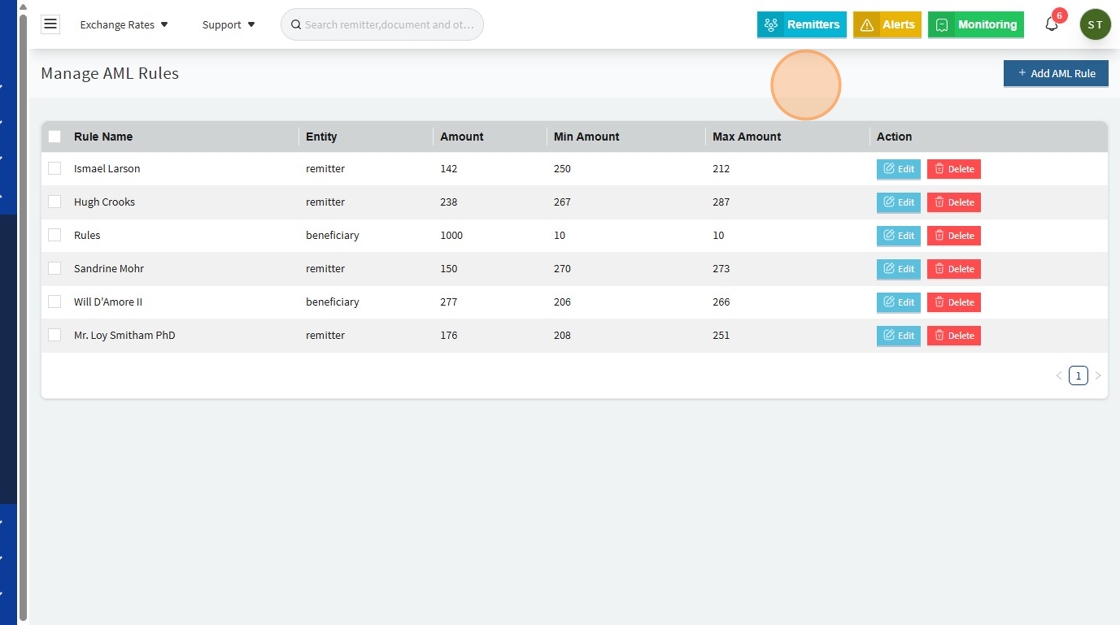
2. Click Add "AML RULE" To create a new one

✏️ Edit AML Rule / ➕ Add AML Rule
Whether creating a new rule or editing an existing one, the fields are the same:
| Field | Description |
|---|---|
| Rule Name | Name of the AML rule (e.g., Ismael Larson) |
| Entity | The entity it applies to (e.g., Individual or Group) |
| Amount | Total transaction amount |
| Min Amount | Minimum allowed transaction amount |
| Max Amount | Maximum allowed transaction amount |
| Amount Operator | Logic operator used to compare amount (e.g., >, <, =) |
| Volume | Total volume of transactions (numeric count) |
| Min Volume | Minimum number of transactions allowed |
| Max Volume | Maximum number of transactions allowed |
| Volume Operator | Logic operator for volume comparison (e.g., >, <, =) |
| Age | Sender or receiver's age |
| Age Period | Time frame used for age-based checks (e.g., per year) |
| Min Age | Minimum allowed age |
| Max Age | Maximum allowed age |
| Action | Action triggered when rule conditions are met (e.g., "Sending to High-Risk Country") |
| Enable | Toggle to activate or deactivate the rule |
⚠️ Note: All required fields must be completed before a rule can be added or saved.
3.
